
This is the first in a series on how I built my homelab. My hosts use older Intel hardware, 6th to 9th gen. It's cheap, and desktops from that period still have useful specs, including NVMe slots. This page is the high-level overview. Each step gets its own guide.
Hardware
I use four desktops: three Proxmox hosts and one Proxmox Backup Server (PBS). For the hosts, look for:
- At least one NVMe slot, for Ceph
- A PCIe 3.0 or newer slot for a 10Gb network card
- Four RAM slots, if you can get them
Each host ends up with three network connections: a USB Ethernet adapter for the host itself, a PCIe NIC for the SAN, and the onboard NIC for the VMs. Shopping list:
- 4 desktops (3 hosts, 1 PBS)
- 4 SSDs for the Proxmox OS
- 3 USB Ethernet adapters
- 4 10Gb PCIe network cards (SAN)
- 3 NVMe drives for Ceph
- RAM
- SFP modules, fiber, and Ethernet cables
None of this is a hard rule. You can use SATA SSDs for Ceph and accept slower performance, or skip Ceph and use NFS. Two RAM slots may be enough, depending on your workloads. What matters is keeping the hosts similar. In a Ceph cluster, one SATA SSD next to two NVMe drives holds the whole cluster to the SSD's speed.
The PBS machine can be less capable. It doesn't need NVMe, and 8-16GB of RAM is enough. It does need a PCIe 3.0 slot for 10Gb and enough ports for its drives, meaning 4-6 SATA ports or an expansion card. I run two PBS machines. The local one has four SATA ports plus an NVMe drive for the OS. The remote one lacked ports, so I added a RAID card flashed to IT mode.
Network
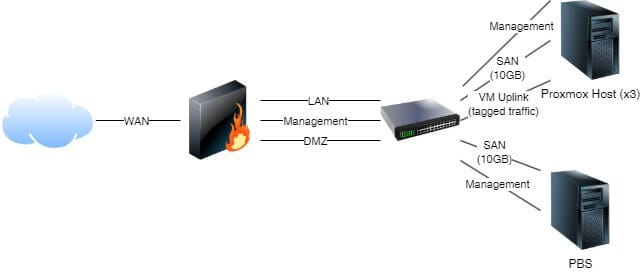
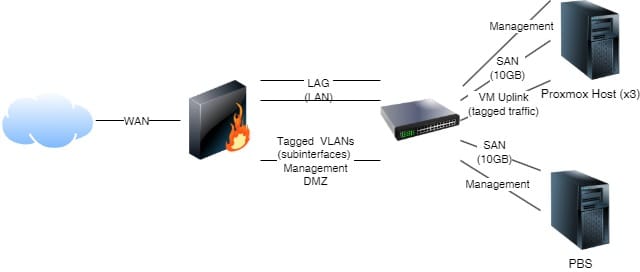
I use an OPNsense firewall and a Brocade ICX6610 switch. You need a managed switch, because the network is split into four parts: management (where the hosts live), the SAN, the LAN, and a DMZ. The firewall must route at least three networks besides WAN. The simplest way is one physical interface per network. If you can, use router-on-a-stick with VLANs instead, so you're not limited by interface count. The first diagram below shows the basic layout. The second shows my version, with tagged traffic on one link and the LAN on a LAGG. A firewall with only two ports could pass management, LAN, and DMZ as tagged traffic in a similar way.
Storage
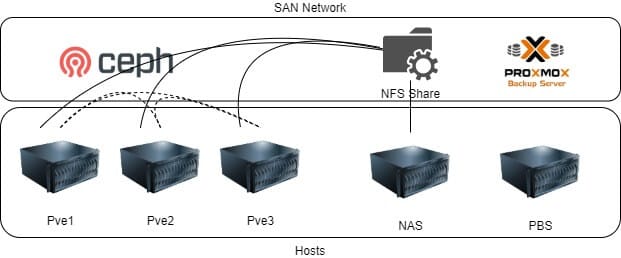
Shared storage lets VMs restart on another host if one fails. The options are Ceph, GlusterFS, or NFS. Since Proxmox VE 8.3, Ceph can be set up in the GUI, so I chose it over Gluster. It gives you HA, and you can add capacity by adding nodes. The hardware requirements are higher than the other options.
I also use an NFS share from my TrueNAS Scale box. That gives partial HA, but if the NAS goes down, the VMs on it go with it. It needs less hardware, since you can run NFS on any machine, including the PBS host. The TrueNAS Scale machine has a dedicated 10Gb NIC for the SAN.
Backups
A local PBS handles day-to-day backups. A second PBS offsite pulls from the local one with a sync job, over a WireGuard tunnel back to my house.