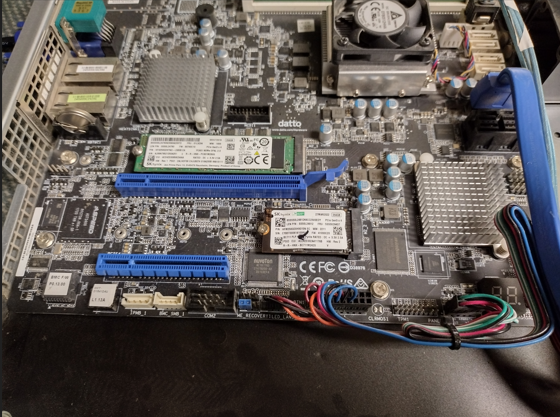
I got an old Datto Siris 3 from a previous job. Its motherboard is an ASRock Rack D1541D4U-2T8R. I had been running TrueNAS on a separate RAID card. My original plan was to add a Mellanox CX311A for 10Gb. Then I looked up the board's specs and found the onboard SAS controller is an LSI SAS 3008, a rebranded 9300-8i. I had assumed I couldn't flash it to IT mode, and I was wrong. It runs at 12Gb/s, compared to 6Gb/s on my current card.
The plan
- Run TrueNAS on a temporary computer
- Reinstall TrueNAS on a mirror of two NVMe drives
- Drop the RAM to 32GB
- Set up a failover NIC
- Flash the onboard 9300-8i to IT mode
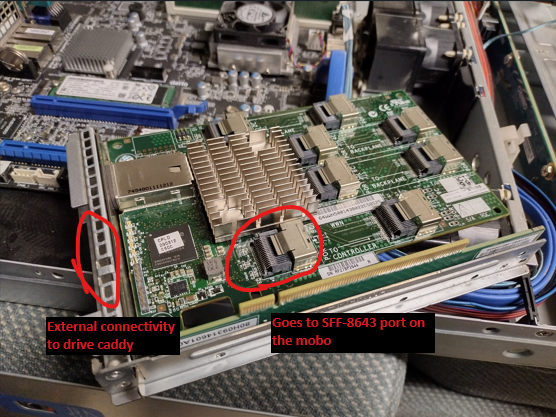
- Install an HP HSTNM-B017 SAS expander for external connections
- Check that the external caddy drives work and hot-swap
Still to do: upgrade the expander to 12Gb/s, set up an SSD dataset, and set up LACP. I'll cover those when I get to them.
Moving TrueNAS to a temporary machine
I needed somewhere to hold my data during the build. I grabbed an old HP desktop and installed TrueNAS on it. For the drives I used a spare Dell H200 from an R710, already in IT mode, and my external drive caddy, which I describe near the bottom of this post.
- On the old server, export the config at System Settings > General > Manage Configuration > Download File, then power it off.
- On the temporary box, upload that file in the same place and reboot.
- At the console, choose "1) Configure network interfaces".
- Remove the alias from the old server's interface.
- On the HP's interface (enp2s0 on mine), add the old IP and CIDR as an alias.
- Save, confirm the web UI loads at that IP, then make the change permanent.
- Optionally remove the stale interface. I didn't, because this was temporary.
I had to remount a few shares on my servers, but everything was back in about 10 minutes.
Fresh install, less RAM, failover
My old setup booted from two SATA SSDs. I may want a six-SSD RAIDZ2 later, so I moved boot to two 256GB NVMe drives I had on hand. Select both drives in the installer and it builds the mirror. I also pulled two 16GB sticks to reuse in my main Proxmox server. 32GB is still plenty here.
IPMI gave me trouble when I tried a static IP, so I left it on DHCP and made a reservation.
The board has two 10Gb NICs, but my switch has only one SFP ethernet port. I don't want to balance traffic across a 10Gb link and a 1Gb link, so the 10Gb NIC is primary and fails over to the 1Gb link.
Flashing the 9300-8i to IT mode
Searching turned up that the onboard controller is a 9300-8i. I started with the ServeTheHome guide (https://www.servethehome.com/flash-lsi-sas-3008-hba-e-g-ibm-m1215-mode/) but needed extra steps:
- I used firmware 16.00.12.00 to avoid this known issue: https://www.truenas.com/community/resources/lsi-9300-xx-firmware-update.145/
- The board has no jumper to put the controller in reset, so flashing from the EFI shell failed.
Skip the EFI shell and go straight to FreeDOS. I'm keeping my EFI attempt below because it explains why FreeDOS is necessary.
What I tried first (EFI shell)
From Broadcom's site I downloaded 9300_8i_Package_P16_IR_IT_FW_BIOS_for_MSDOS_Windows, and Installer_P14_for_UEFI.zip for sas3flash.efi. I copied SAS9300_8i_IT.bin, mptsas3.rom, and mpt3x64.rom to an NTFS-formatted USB drive, along with sas3flash.efi. I booted with F11 into the UEFI shell, changed to the drive (FS1:), and ran "sas3flash.efi -list" to record the SAS address. I then erased the flash and tried to write the new firmware. It failed, because I couldn't put the card into reset mode. I rebooted to check I hadn't bricked anything, and it was fine.
What worked (FreeDOS)
- Write FreeDOS to a USB drive with Balena Etcher.
- Copy the same files as before: SAS9300_8i_IT.bin, mptsas3.rom, mpt3x64.rom. This time add the DOS flasher, sas3flsh.exe. FreeDOS limits filenames to eight characters, so I renamed the firmware to 9300.bin.
- Boot the Siris 3, press F11, and boot FreeDOS.
- Run DIR to confirm all files are there.
- sas3flsh.exe -list (write down or photograph the SAS address)
- sas3flsh.exe -o -e 7 (wipe the flash)
- sas3flsh.exe -o -f 9300.bin -b mptsas3.rom (flash firmware and BIOS)
- sas3flsh.exe -b mpt3x64.rom (update the UEFI BSD BIOS)
- sas3flsh.exe -o -sasadd XXXXXXXXXXXXXXX (replace the X's with your SAS address from step 5)
SAS expander
I have two HP HSTNM-B017 SAS expanders. They run at 3Gb/s, which is fine for this use; I may upgrade later. One goes in the server and uses the SF-8088 port on the back for external connectivity. It links to the second expander, which feeds my drive caddy. That makes it easy to swap drives in and out for cold storage backups. An SFF-8643 to SFF-8087 cable connects the board to the Controller port on the expander.